❗ Missing Textures? World, Players or NPCs Not Loading?
Two different loading problems have opposite fixes, so check which one you have before touching anything. One is hard to miss. The other you mostly notice because something in the city doesn't work.
Which one do you have?
A: The WORLD or the PLAYERS in it are missing. Whole buildings, roads or patches of ground just aren't there. Other players are invisible. Cars are missing. Or textures load blurry and low-res and never sharpen up. The classic version: a crowd gathers in one area and parts of the ground start disappearing.
→ Your Extended Texture Budget is too LOW for the load. See Fix A: raise the budget.
B: An NPC or object never spawns. This one is easy to miss, because there is no hole in the world to see: the spot looks normal, and you may have no way of knowing anything was supposed to be there. The clue is that something doesn't work. A shop has nobody to talk to, a job spot does nothing, a recycling point has nothing to interact with. When this happens the game also throws an error: it asked for that model, couldn't load it in time, and gave up. The usual cause is an Extended Texture Budget turned up so high that it starves the memory that loads models.
→ See Fix B: lower the budget.
The quick tell: if you can SEE things vanishing (map, buildings, cars, other players), that's A. If things just don't work and you're getting an error, that's B. If your budget is already turned up and you're hitting B, the raised budget is the likely cause. Raising it further makes it worse.
Fix A: raise the budget (carefully)
For missing world, invisible players, missing cars, or blurry textures.
- Open the main menu with
ESC, click Settings, then Graphics, and scroll down to Extended Texture Budget. - Raise it until the Video Memory bar is around the yellow, never into the red.
- No restart needed, though it can take a minute to stream everything back in.
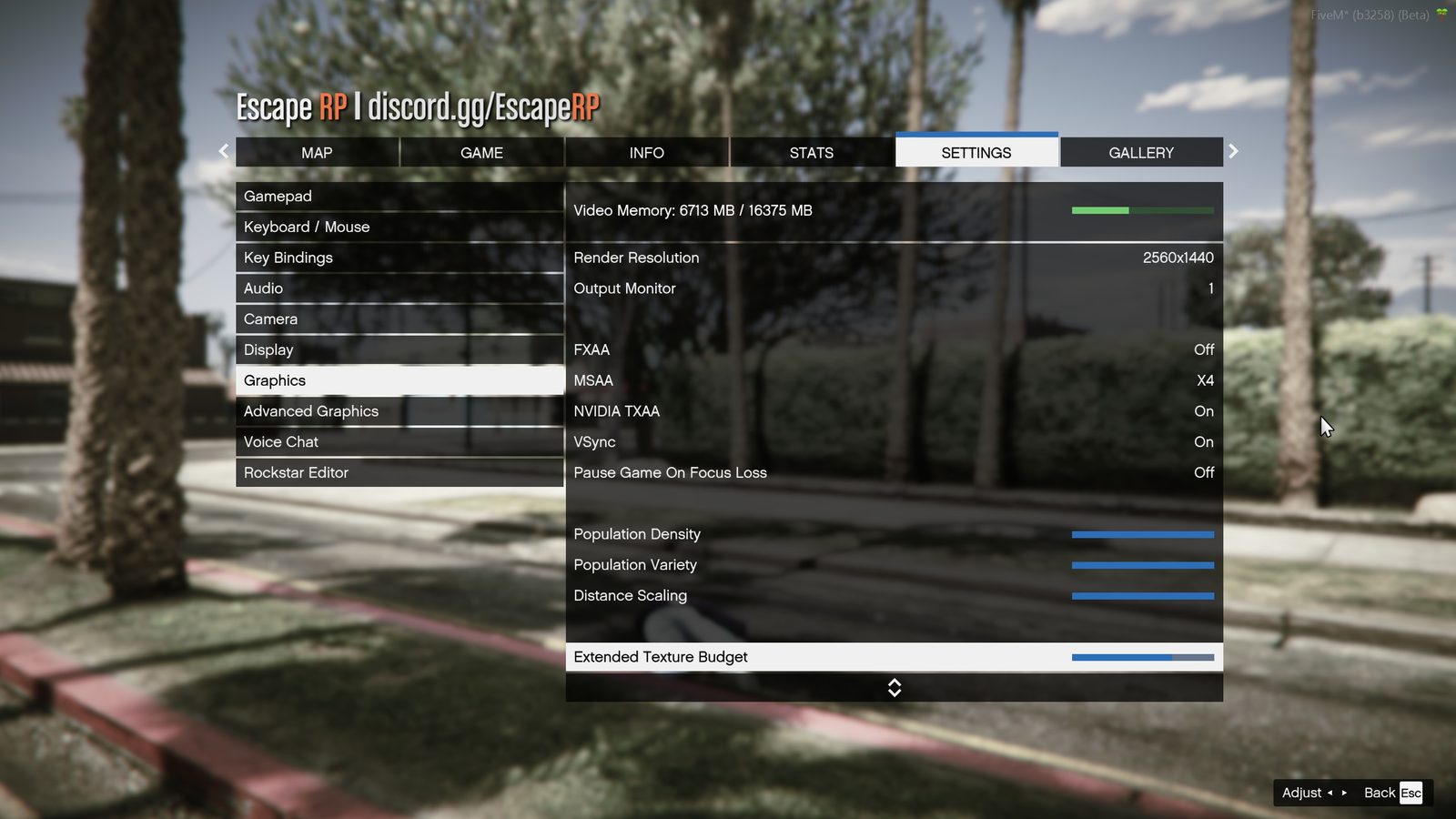 Settings → Graphics → Extended Texture Budget
If you're already near the red and the world is still vanishing, lower Texture Quality one step instead. Your card is out of room.
Fix B: lower the budget
For NPCs or objects that never spawn.
When the Extended Texture Budget is set higher than your PC can actually afford, it starves the memory the game uses to stream models. The request for that NPC or object times out and the game gives up. That is why turning the budget up makes this one worse.
ESC, then Settings, Graphics, Extended Texture Budget.- Lower it: around halfway, or near minimum if it keeps happening. Keep the Video Memory bar comfortably out of the red.
- Fully close FiveM and rejoin. The restart matters for this one; the starved streaming memory doesn't reliably recover on its own.
Also helps with B:
- Long sessions make it worse. If NPCs stop spawning after hours in the city, rejoin.
- Close other things using your graphics card (browsers playing video, second games).
- If it still happens every session with the budget already low, clear your FiveM server cache and rejoin. If it persists after that, open a ticket: at that point it isn't your settings.
Still broken?
Open a support ticket and tell us: whether it looks like A or B, a screenshot of what's missing (include the error text if you got one), and your graphics card model. That's everything staff need to help quickly.